







Flexible deposits and loan payments made to fit your life.

Making a deposit to your HarborLight checking or savings account or paying your auto loan or mortgage has never been easier! Discover a few ways to make a deposit into your account and the many ways you can make a loan payment. If you have questions about either process, feel free to view one of our Video Tutorials or contact us or visit a branch.

Make a Deposit Online

Fund your HarborLight account online with any credit card, debit card, or your checking account at another financial institution. 

  • Deposit through our website, on your smartphone, or with a text message
  • Make a one-time deposit or schedule regular deposits
  • Deposits may take up to 5 business days to post to your HarborLight account 

There is a convenience fee for using this service. The fee is displayed before submitting a deposit. Using a Checking Account Number from another financial institution has no convenience fee at this time. 

If you have any questions about this service, please contact HarborLight Credit Union. Other fees and/or restrictions may apply.

Make a Deposit

Make a Loan Payment

At HarborLight Credit Union, we’re committed to making your banking easier and more secure.

Please note that ProPay stopped processing all payments effective November 20, 2025. While you can still view past payments in ProPay until December 1, 2025, no new payments will be accepted.

To avoid missed payments, late fees, or disruptions, we strongly encourage all members to switch to MessagePay as soon as possible. MessagePay is our modern, text and online payment solution that gives you more control.

Why the change?
  • Pay your loans via text, web, or mobile - anytime, anywhere
  • Get real-time confirmation and reminders
  • Fewer hassles
  • A convenience fee applies for using this service, which is displayed before submitting a payment. However, using a Checking Account Number from another financial institution has no convenience fee at this time.
What this means for you:
  • ProPay is no longer processing payments as of Nov. 20
  • Any recurring payments left in ProPay will not be processed
  • To avoid payment disruption or duplicate charges, please switch to MessagePay today
How to get started (3 simple steps):
  1. Visit the MessagePay Make a Payment setup link and select “Make a Loan Payment” (hyperlink)
  2. Enter your account number and date of birth to verify your identity
  3. Add your preferred payment method (bank account or debit card) and schedule your payments
  4. Confirm the setup and you’re done — you’ll receive a confirmation text or email
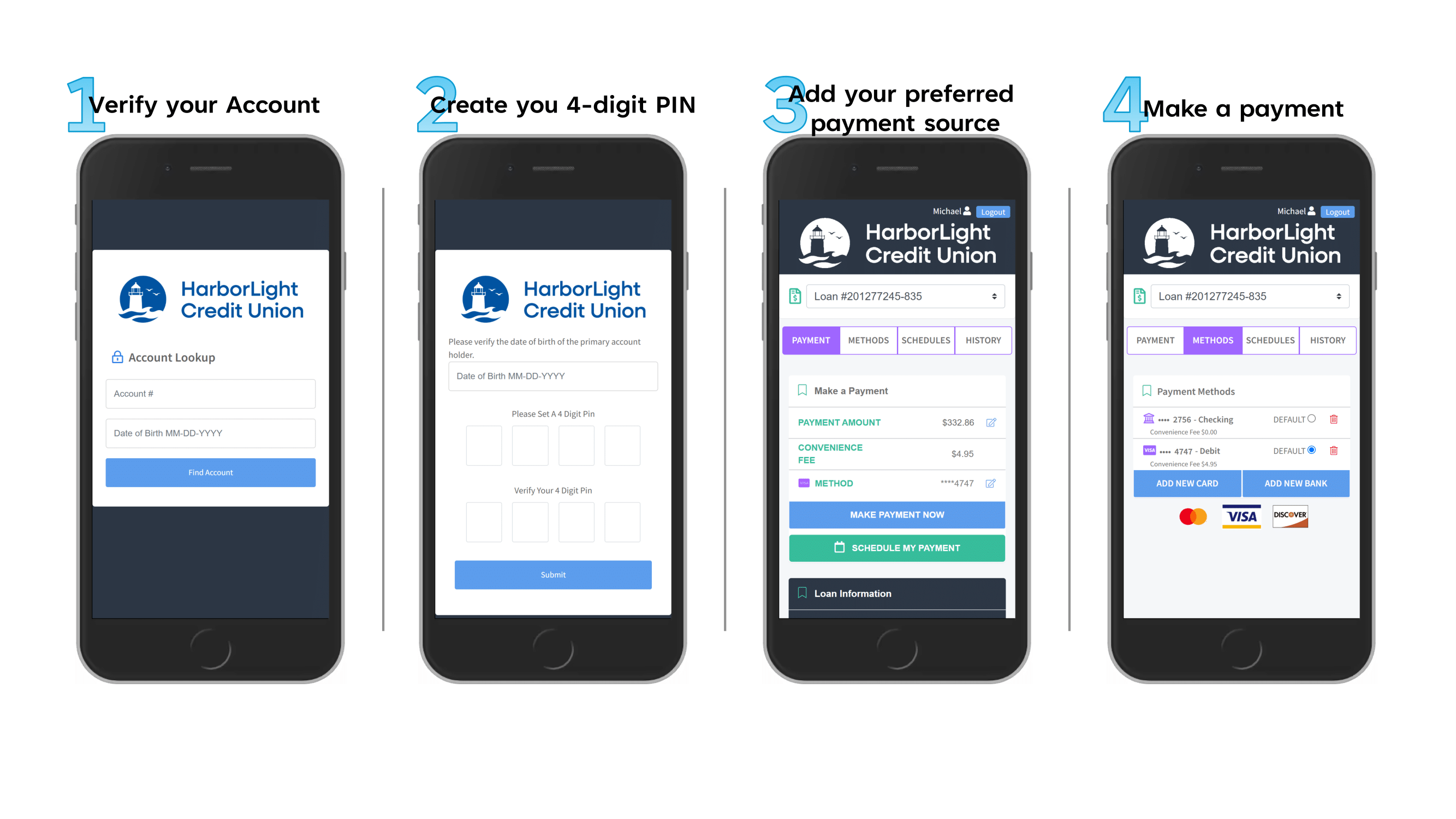
Did you get a text from us about your loan payment? 
 
Recently, we sent out a text notification regarding our new payment system. These messages were intended only for members who enrolled in the service, but they were sent more broadly than planned. We’re currently fine-tuning the system to ensure everything works as expected.
 
If you have a loan with HCU that is paid directly from your HCU account, there is no action required on your part. Your payments will continue as usual.
 
If you prefer not to receive these notifications, you can simply reply STOP to end them.
 
Thank you for your patience as we improve your experience with our new payment system!
 
 
Need more help?

We’re here for you every step of the way. Stop in at either branch, call us at 231.894.5608, or set an appointment here
 
Thank you for being a valued member of HarborLight Credit Union — because we’re more than money, we’re your financial partner.